Post
Mechanical Keyboard Switches: 7 Amazing Secrets for Your Setup
Jun
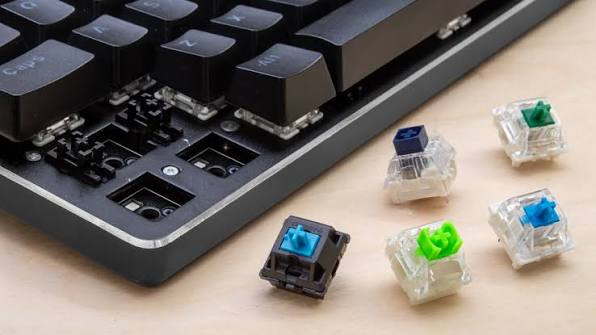
In the passionate and rapidly growing community of custom PC peripherals, the aluminum chassis, the RGB lighting, and the artistic keycaps often steal the visual spotlight. However, the true, beating heart of any typing instrument lies entirely hidden beneath the surface. We are talking about the incredibly complex, micro-engineered world of Mechanical Keyboard Switches. These tiny plastic and metal mechanisms dictate the exact physical feel, acoustic sound, and reaction speed of every single keystroke you make.
For decades, consumers were completely unaware of what lay beneath their keys, forced to endure the mushy, fatiguing feel of cheap rubber membrane boards. Today, the modern user has absolute control over their tactile destiny. Whether you are a competitive esports athlete demanding lightning-fast input registration, or a professional programmer seeking a highly tactile, deeply satisfying typing rhythm, choosing the correct switch is paramount. In this comprehensive technical masterclass, we break down the spectacular engineering behind these mechanisms and explore the 7 amazing secrets to selecting the perfect Mechanical Keyboard Switches for your daily setup.
1. Understanding the Anatomy of Mechanical Keyboard Switches
Before you can choose the correct type of switch, you must first understand the fundamental physical architecture of the mechanism itself. Every traditional mechanical switch consists of four vital, microscopic components working in perfect harmony.
First, the Stem is the moving plastic part that connects directly to your keycap and determines the exact tactile feel of the keystroke. Second, the Upper and Lower Housing form the protective plastic shell that guides the stem and dictates the acoustic resonance of the switch. Third, the Spring provides the physical resistance (measured in grams of actuation force) and pushes the key back up after it is pressed. Finally, the Metal Contact Leaves are two tiny pieces of copper that touch each other when the stem goes down, closing the electrical circuit and sending the signal to your PC. To explore the deep industrial history of these input mechanisms, you can review the extensive Wikipedia database on keyboard technology.

2. Linear Switches: The Gamer’s Absolute First Choice
In the highly competitive arena of fast-paced first-person shooters, friction is the absolute enemy of speed. Linear Switches (most commonly identified by a Red, Black, or Silver stem) are meticulously engineered to provide a completely smooth, uninterrupted keystroke from top to bottom.
There is absolutely no tactile bump or audible click to overcome. This frictionless design allows competitive gamers to rapidly “double-tap” or “spam” keys with minimal physical effort. The “Speed Silver” variations feature an incredibly high actuation point, meaning the electrical signal is sent the very microsecond your finger brushes the keycap. This guarantees the absolute lowest physical input latency possible. If your primary goal is maximizing your reaction times in high-stakes tactical shooters, linear switches are your ultimate weapon.
3. Tactile Switches: The Programmer’s Ultimate Dream
If you spend 10 hours a day writing complex backend code, editing massive spreadsheets, or drafting essays, a perfectly smooth keystroke can actually lead to frequent typos, as your fingers cannot physically feel when the key has successfully registered. This is where Tactile Switches (typically featuring Brown or Clear stems) excel brilliantly.
These switches feature a distinct, highly satisfying physical “bump” roughly halfway down the keystroke. This bump provides instantaneous physical feedback to your fingertips, confirming that the electrical signal has been sent to the motherboard. This allows professional typists to immediately move on to the next letter without needing to aggressively “bottom out” the key against the plastic chassis. This fluid, rhythmic typing dynamic drastically reduces severe finger fatigue during marathon working sessions.
4. Clicky Switches: The Vintage Typewriter Experience
For individuals who desire an incredibly loud, aggressive, and highly pronounced typing experience, Clicky Switches (traditionally utilizing Blue or Green stems) are the classic choice. These switches combine the physical bump of a tactile switch with a secondary plastic mechanism called a “click jacket” or “click bar.”
When you press the key, this secondary mechanism snaps violently against the housing, producing a sharp, high-pitched, and incredibly loud “Click!” noise. While this provides highly satisfying acoustic feedback reminiscent of a vintage 1980s typewriter, it is absolutely crucial to note that clicky switches are universally despised in open-office environments and shared dorm rooms. If you utilize a sensitive microphone for game streaming or corporate video calls, the loud acoustic signature will heavily bleed into your audio feed.
5. Mastering Actuation Force and Spring Weights
The “Color” of the stem dictates the tactile style, but the internal spring dictates the physical weight. Mechanical Keyboard Switches are measured by “Actuation Force”—the exact amount of pressure (in grams) required to register an input. A standard Red linear switch typically requires a very light 45g of force, making it effortless to press.
However, users with heavy hands often find 45g too light, resulting in accidental keypresses simply by resting their fingers on the home row. Upgrading to a heavier switch, like a Black linear (60g) or a Clear tactile (65g), provides significantly more resistance. This creates a much more deliberate, forceful typing experience that completely eliminates accidental typos and provides a deeply satisfying, cushioned bounce-back.
6. Factory Lubing and Absolute Acoustic Tuning
As we discussed extensively in our highly detailed companion guide on Custom Keycap Sets, the sound profile of your keyboard is a vital component of desktop luxury. Out of the factory, raw mechanical switches consist of dry plastic rubbing against dry plastic, which creates a highly irritating, scratchy acoustic sound and feel.
Premium boutique switches (such as Gateron Oil Kings or C³ Tangerines) arrive “Factory Lubed.” Manufacturers apply specialized synthetic greases (like Krytox 205g0) directly to the internal plastic rails and metal springs. This microscopic layer of lubrication completely eradicates internal friction and spring ping. The result is a buttery-smooth, deeply resonant “thock” sound that instantly elevates the acoustic profile of your keyboard from a basic peripheral to a premium musical instrument.
7. Embracing the Hot-Swappable Ecosystem
Historically, choosing your Mechanical Keyboard Switches was a terrifying, permanent commitment. If you bought a keyboard with Blue switches and ended up hating the loud noise, you were stuck with it, unless you knew how to operate a dangerous soldering iron to melt the metal joints off the motherboard.
Today, the industry has been completely revolutionized by Hot-Swappable printed circuit boards (PCBs). This phenomenal engineering allows you to simply pull the old switches out with a small metal tool and push a completely different set of switches in, literally like building with LEGO bricks. If you want to explore the absolute highest-end, fully customizable boards that support this technology, we highly recommend reading our definitive Premium Mechanical Keyboards Guide to find your perfect base chassis.
Frequently Asked Questions
Can I mix different types of switches on the exact same keyboard?
Yes, absolutely! If you own a modern hot-swappable keyboard, you can heavily customize your layout. Many advanced professional gamers place ultra-light, hyper-fast Linear switches on their WASD movement keys for speed, while utilizing heavy Tactile switches for their Spacebar, Enter, and Esc keys to prevent accidental actuation during tense moments.
How long do Mechanical Keyboard Switches actually last?
Compared to standard rubber membrane keyboards that rapidly degrade after 5 million keystrokes, premium mechanical switches are engineered for extreme, industrial-grade durability. High-quality switches are rigorously rated by manufacturers to survive anywhere from 50 million to a staggering 100 million keystrokes, ensuring they will easily outlast multiple different computer builds.
Conclusion
In summary, carefully selecting your Mechanical Keyboard Switches is the absolute most important decision you can make when curating your personal digital workspace. By thoroughly understanding the distinct physical advantages of Linear speed, Tactile feedback, and optimized spring weights, you can perfectly tailor your keyboard to match your exact typing style and gaming requirements. Stop settling for fatiguing, uninspiring typing experiences and unlock your absolute peak physical performance today by exploring the elite switch collections available at the BTCGO hardware boutique.
